GitHub Copilot Free Plan: Limits and What You Can Use
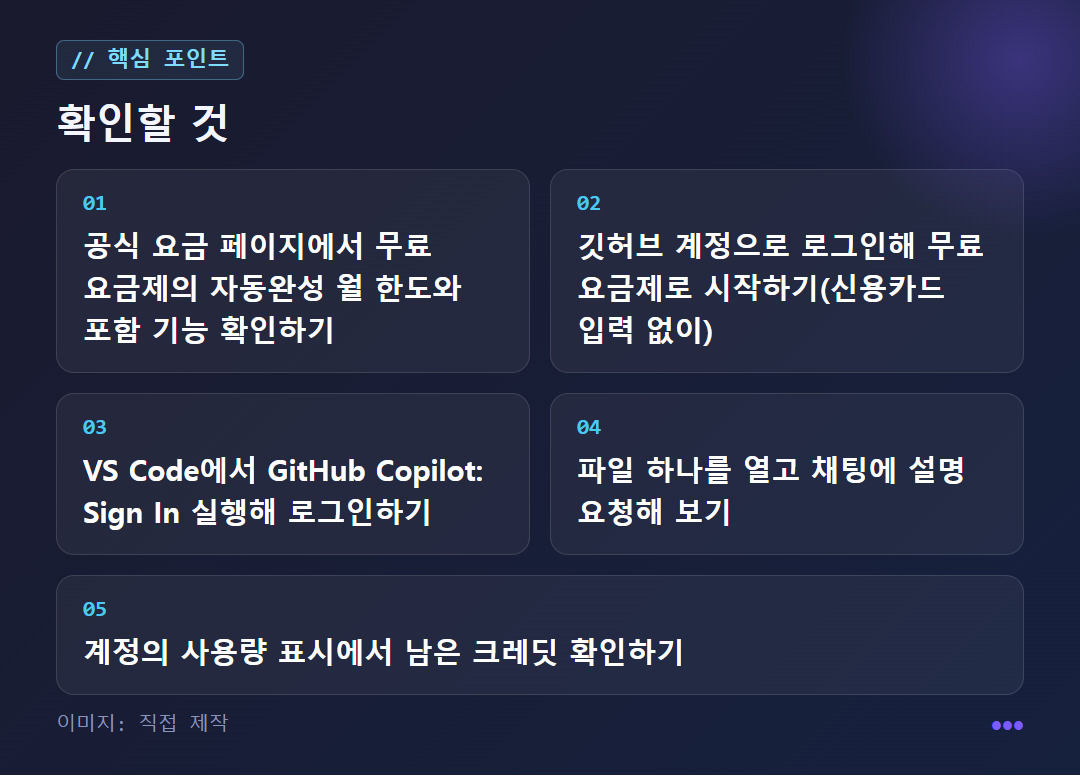
Start without a card, with up to 2,000 autocompletions a month. Skim these items before you pay.
Getting ready to depart
Fuel calculation
Pricing route
Safety check
Frequently asked questions


A Closer Look
How much can I use on the free plan?
In short, if you're just learning to code or only write the occasional script, the free plan is enough to get started. All you need is a GitHub account, and no credit card is required.
Code autocomplete (a feature that shows the next code ahead of time while you type) is limited to 2,000 times a month. Agent mode (a feature where the AI edits files and runs commands), Copilot CLI (a separate tool used in the terminal), MCP connections, and repository rules files are also available on the free plan. However, the official pricing page states that free users are limited to access to entry-level models, meaning basic models with reduced performance.
Chat and agents run only within a set amount of credits, and you can see what's left in your account's usage display. One outlet described free chat as 50 messages, but that figure comes from an article as of July 2026, so you need to check the official pricing page again to see whether it is still the same.
Start with VS Code. After installing it from the official site, if the sign-in window doesn't appear, run 'GitHub Copilot: Sign In' from the Command Palette (Ctrl+Shift+P on Windows, Command+Shift+P on Mac). If you only use Copilot, you don't need to connect a separate API key. A good first exercise is to leave a file open and ask, "Explain what this file does at the level of someone learning to code for the first time." If the feature is turned off on a company account, the organization admin has to change the policy.
What's the difference between free and paid?
The biggest differences are the number of autocompletions and the availability of some features. On paid plans, autocomplete and next edit suggestions continue without limit and without using credits. The free plan stops at 2,000 per month.
Divided into a daily average, that is about 60. It can be tight for someone who codes all day, and plenty for someone who uses it for an hour or two on weekends. Next edit suggestions is a feature that looks at what you just changed and points out where to edit next.
To sum up: Agent mode and Copilot CLI are available on both free and paid plans. Code review is not in the free plan and is provided on paid plans. The cloud agent is also not in the free plan and can be used starting with Pro.
The external cloud agent preview, which lets you hand tasks to Claude and Codex agents from within Copilot, is available only on Pro+ and Max. Using this feature does not come bundled with a Claude Code or ChatGPT subscription. This is based on material transcribed from the official announcement dated 2026-10-04.
What are the AI credits that changed in June?
Starting June 1, 2026, GitHub introduced "GitHub AI Credits" across all Copilot plans. One credit is worth $0.01, and every plan includes a monthly allowance. Using chat, agent mode, code review, the cloud agent, or Copilot CLI draws down your credits.
How much is deducted each time depends on the model you pick and the size of the task. The official page explains that a simple question to a lightweight model uses less than 1 credit, while a long agent task spanning many files on a high-performance model uses far more. Even the same "single chat" can cost very different amounts.
When you run out of credits, you can wait until the next renewal date, or, if you are a paying user, upgrade your plan or set an additional usage budget. The easily confusing point is that this budget is not a setting that gives you free extra credits; it is a cap on what you can be billed for usage beyond the included amount. A $10 budget equals 1,000 credits, and you get notifications when you reach 75%, 90%, and 100% of the budget you set. There is also an explanation that included credits reset at 00:00 UTC on the 1st of each month.
How much do paid plans start at, and is there a way to get more without paying?
The individual plans are Free, Pro, Pro+, and Max. According to material compiled as of July 2026, Pro is $10/month, Pro+ is $39/month, and Max is $100/month. Organization plans are priced per seat (a license used by one user), with Business listed at $19 and Enterprise at $39. These may vary depending on region, taxes, and promotions.
It has been reported that the monthly subscription fee stays at its previous level, but each plan includes only that amount's worth of AI credits, and exceeding it incurs extra charges. Also, GitHub temporarily suspended new paid plan sign-ups on April 20, so you should check the pricing page to see whether you can sign up right now.
If you are eligible, you can get paid features without paying. Verified students have a separate plan called Copilot Student, and verified teachers and maintainers of popular open-source repositories can apply for Pro for free. This is a different concept from the free plan that anyone can use, and when your eligibility ends, you return to the standard pricing structure.
Approval may take time. One source says that a pre-registered university email is processed automatically, but there have been cases where manual verification was needed and it took a long time. Check the conditions on the official application page for the GitHub Education program.
Is it the same as Microsoft Copilot? What should I watch out for?
No, it is different. The shared name causes a lot of confusion. Microsoft Copilot, used in Windows, Edge, Word, and Excel, offers free Copilot Chat with a Microsoft account, and to use AI inside Office apps you need to look at a paid Microsoft 365 subscription. The personal M365 Personal plan is listed at KRW 12,500/month (KRW 125,000/year). GitHub Copilot for developers is a completely separate product, with personal plans starting at $10/month. If you write code, the GitHub Copilot in this article is the one that applies to you.
Before using it, check your organization's policy before pasting files that contain confidential company code or personal information into chat. On organization accounts, administrators can turn features off or set budget limits.
Copyright is also worth mentioning. According to the official explanation, Copilot's suggestions occasionally (less than 1% according to GitHub's research) match public code that was used for training. If you turn on the code-matching filter, suggestions that are the same as or nearly the same as public code are not shown. A match is more likely in empty files with almost no context or in code that uses common approaches, so it is safer to read and understand a suggestion before using it rather than pasting it as is.
This article is a summary based on excerpts from the official pricing page and press and blog sources, and it is not a hands-on review. Limits and prices may change.
✦ Go see this star on the 3D map