What to Hand Off to Manus, Its Limits, and What to Check Before Uploading
Hand off repetitive work like organizing tables and analyzing CSVs, and keep big jobs, personal data, and final decisions in your own hands.
Route
Another route (if you need to keep the planning document as the team's standard)
Frequently asked questions


A little more detail
What kind of work suits Manus?
Drafts of repetitive work are fine to hand off. Research, organizing tables, comparison, and visualization are the zones where Manus's cluster shines brightest. The explainer I referred to gives examples of doing research, building tables, drawing charts, and even producing a draft web page. Another article comparing planning tools also says Manus may be a good fit if you want to hand off market research and several tasks at once.
The key point is that the output is a 'draft.' It is used most reliably when a person sets the direction, checks along the way, and takes final responsibility.
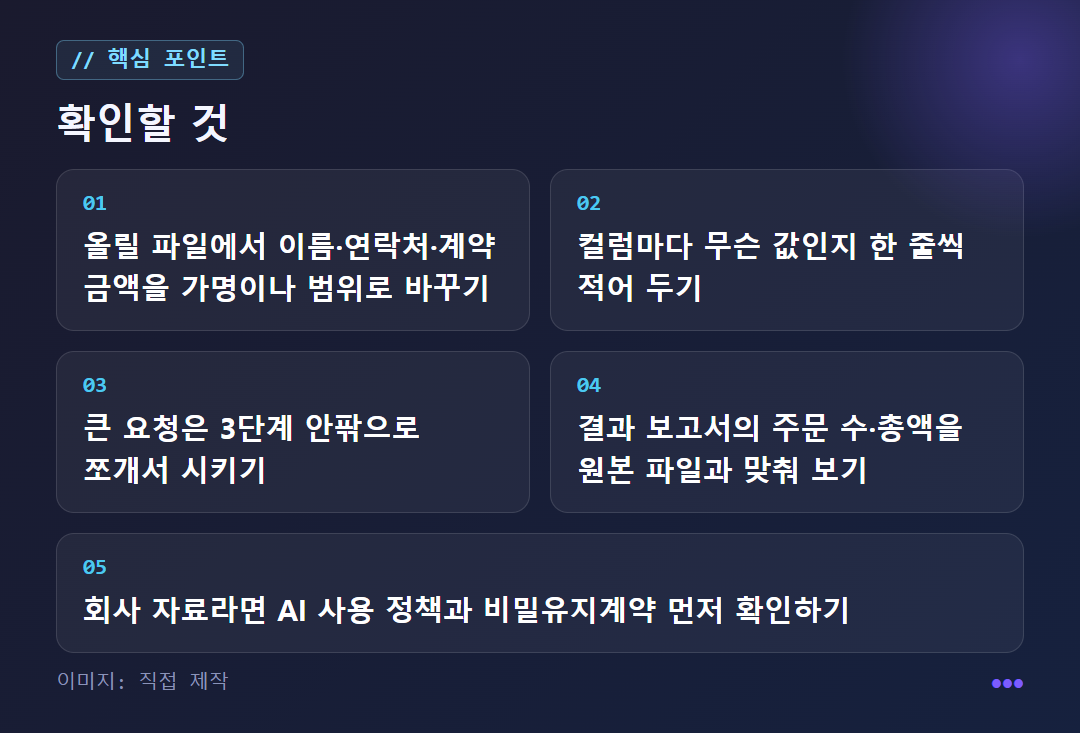
You can also hand off CSV or Excel files. The official documentation reportedly describes a workflow where you upload the raw data, write in plain words what you want to know, and get it turned into outputs like charts, reports, slides, and dashboards. Unlike asking a chatbot to 'tell me about this data,' the explanation is that the file itself becomes the object of work. With cafe order data, you could ask which menu items drive sales, or whether customers crowd in more in the morning or the afternoon. However, if you don't say whether the payment amount is the order total, the unit price, or the amount after discounts, you may get a wrong calculation, so add a one-line description for each column.
Where is Manus weak?
The bigger and more complex the job, the sooner it hits its limits. Reviews and user reports say that on complex tasks, repeated loops, incomplete results, server congestion, freezing, and context (the amount an AI can remember at once) limits can appear. The NxCode review also judges that large projects reach the limits quickly and that you need the patience to put up with the instability of a beta version.
This review recommends using their own service if your goal is building apps. That is the claim of the company in question, so don't take it at face value and treat it only as a point of comparison.
Numbers are another zone to be careful with. Sales, order counts, ratios, and chart axes in the report should be checked by hand, just as you would double-check an Excel file made by a person. If the number of rows in the original CSV and the order count in the report differ greatly, the criteria may have changed during duplicate removal or handling of missing entries. If the per-product contribution is an estimate rather than the actual unit price, ask it to write 'estimate' in the table. A report that marks its limits is actually more trustworthy.
What should I remove before uploading a file, and can I use it for company work?
Start by changing names, contact details, and contract amounts. The explainer's example is to change 'Kim Minji, 010-1234-5678, a KRW 32,400,000 contract' into 'Customer 01, contact deleted, a contract in the KRW 30 million range.' It also introduces keeping only the domain for emails and changing amounts to ranges.
Masking means covering up sensitive parts; anonymizing means changing a file so that no specific person or company can be recognized. There's no need to overthink it: just ask, "Could someone who sees this file tell who it's about?" If they could, remove more.
For company materials, it's safer not to decide on your own. First check the company's AI usage policy, its personal data handling standards, any confidentiality agreements signed with clients, data retention periods, and whether external tools are allowed. On a team account, administrators may be able to see your work or an audit log may be kept, and processing company materials with a personal account can itself be a problem. The standard is not "it's my account, so it's fine" but who owns the materials.
What if I gave it a big task and it seems to have stopped?
Don't wait. Break the task into smaller pieces and ask again. The longer you wait, the more credits (the unit of usage spent on tasks) and time it may cost. Leaving it alone and assuming the agent will sort it out is the mistake beginners make most often.
A bad example is "Research the domestic and global generative AI market and make a report and even slides." That's like handing over a long voyage in one go.
Instead, split it into three legs. First, "Find just 5 sources on the size of the Korean generative AI market as of 2026, with their references." Then, "Compare the 2 most reliable of those." Finally, "Turn the comparison into an outline for a 5-slide deck." If you check the result of each leg with your own eyes before moving on, a failure costs little and you can see right away where things went wrong. Slowing down whenever permissions, money, personal data, copyright, or an important decision comes up is the basic rule of this route.
When is another star better than Manus?
If you need to leave behind a team's reference document, a dedicated planning tool is a closer fit. This applies when many policies and exceptions are still undecided, and you need to keep records based on requirements documents, feature specifications, and user flows. Manyfast, introduced in the comparison article, shows how a decision changed in a meeting affects the existing plan as a proposed change, and lets a person choose whether to apply it.
However, this description comes from Manyfast's own company blog, so it mixes in a promotional perspective. Take it as a reference only.
Let's also note pricing. The material checked this time does not include Manus's pricing, free tier limits, or per-credit price. So we did not put it in a table, and we recommend checking the official pricing page yourself before signing up. If you're new, the safest first voyage is to ask just one question about a single practice CSV file that contains no personal information.
✦ See this star on the 3D map