Team Plan vs. Personal Plan: Comparing Notion and Claude Seats
If it's just you or one or two people, take the personal orbit. If you need to manage billing and accounts in one place, take the team orbit.
What differs by orbit
- Notion Free: unlimited pages and blocks if you're alone
- Block limit applies with multiple people
- Attachments up to 5MB per file
- Claude Pro·Max·Ultra
- Notion Plus (limited to 1 member, free for students and educators)
- Each person pays with their own card
- Claude Team: central billing, SSO, domain verification
- Standard seats and Premium seats
- Notion paid plans: billed one seat per member
- Claude Enterprise: SCIM, audit logs
- Notion Enterprise: workspace-wide analytics
- Price depends on organization size and contract commitment
When to choose the personal orbit, and when the team orbit
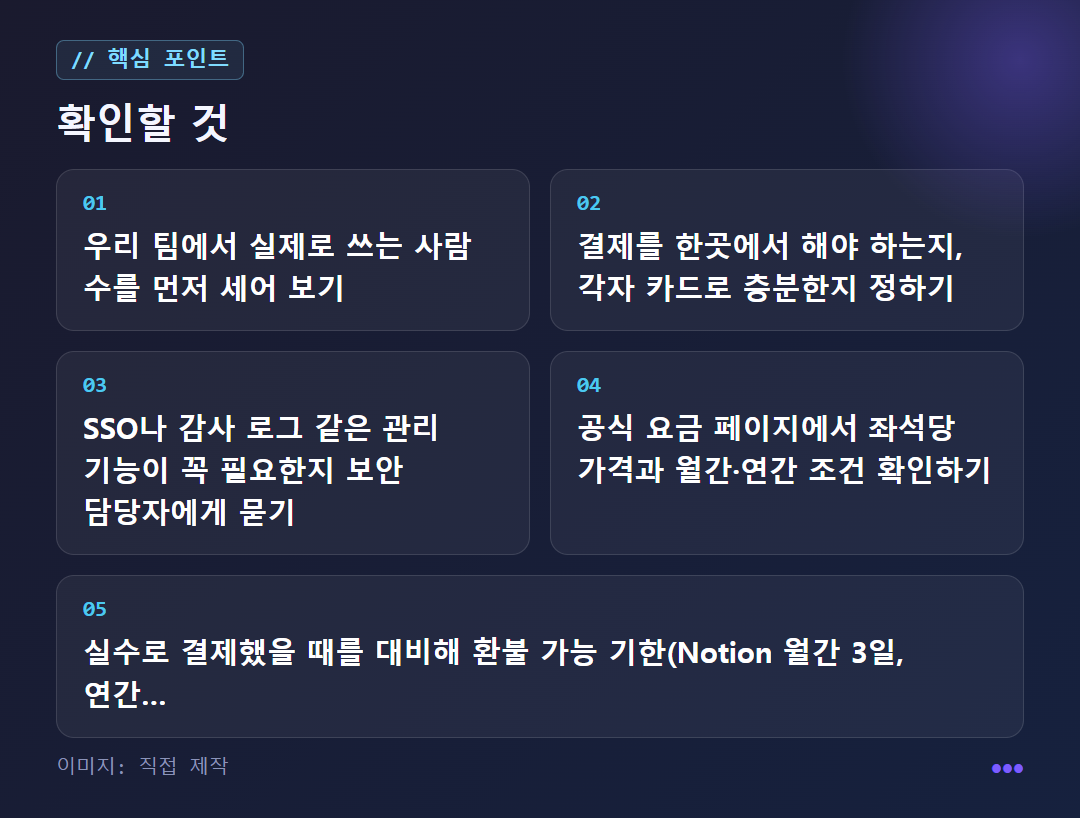
10-minute check route before switching to a team plan
Members who rarely use it still take up a seat
If everyone paying with their own card is enough, choose an individual plan
SSO comes with Team, audit logs with Enterprise
Multiply the unit price by your headcount
Notion: 3 days for monthly, 30 days for annual
Frequently asked questions

A closer look
How is a team plan different from an individual plan?
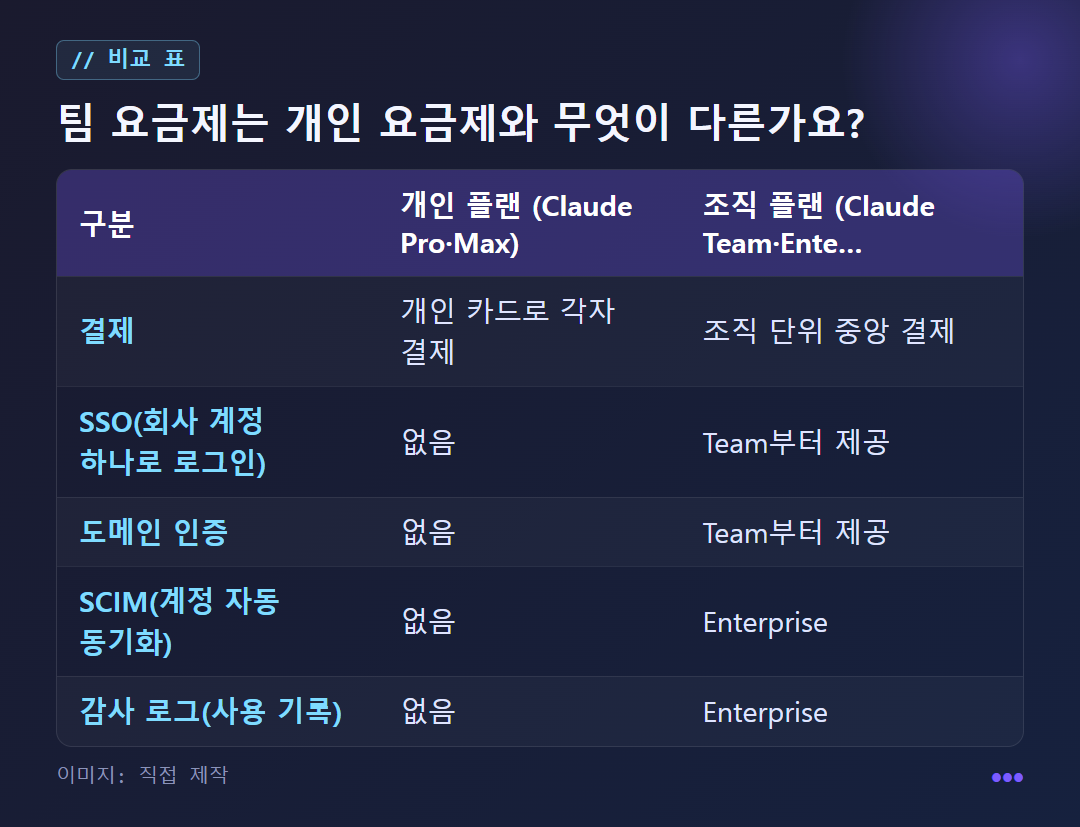
The difference is in admin features, not usage. According to an explainer article (usingclaude.com, October 2026), Claude's individual plans, Pro and Max, focus on usage and model access, while the organization plans, Team and Enterprise, put the emphasis on admin features, security settings, and collaboration among members.
Billing differs too. On an individual plan each person pays with their own card, while a team plan uses central billing at the organization level. Notion works the same way: once you upgrade to a paid plan, each workspace member counts as one seat.
In terms of features, SSO (signing in with one company account) and domain verification start with Team. SCIM (automatic account syncing) and audit logs (usage records) are added in Enterprise, and individual plans do not have these features. However, this explainer is an unofficial site, so it may differ from the original text on the official pages.
What changes in Notion between using it alone and using it as a team?
Notion has four tiers: Free, Plus, Business, and Enterprise. The confusing part is the block limit on the free plan. A block is one piece of content you put on a page, such as a checkbox, a paragraph, or an image.
A free workspace for an individual user can add unlimited pages and blocks. A free workspace shared with several members has a block limit until you upgrade. In other words, even on the same free plan, the limit depends on whether you are alone or with others.
The Plus plan is limited to 1 member and is free for students and educators. On the free plan, attachments are limited to 5MB per file, and on paid plans you can upload up to 5GB per file. Page view analytics also differ by tier. Free and Plus show the viewer list and views by time period; Business adds a list of page editors; and Enterprise includes per-user analytics and workspace-wide analytics.
How does Claude separate Pro·Max from Team·Enterprise?
According to the official pricing page, the individual plans are Free, Pro, Max, and Ultra, and the organization plans are Team and Enterprise. Max offers 5x the usage of Pro, and Ultra offers 10x Pro's weekly usage. Team has two kinds of seats: the Standard seat gives more usage than Pro, and the Premium seat gives 5x more usage than Standard.
Activity on the web app, desktop, mobile, and Claude Code is deducted from the same usage pool. There is no fixed number of messages, and how fast the pool is used up depends on conversation length, the model, and the features you use.
Enterprise has two routes: self-service or sales-negotiated. The negotiated price depends on the size of the organization and the commitment, so you need to ask through Contact sales. The explainer recommends starting with Team if you have fewer than 50 people and simple requirements, and Enterprise if you need SCIM and audit logs. The per-seat price is not in the sources for this article, so we have not listed it. Please see the official Claude pricing page.
How is pricing calculated by number of seats, and how do cancellation and refunds work?
According to Notion's official guide, paid plans are billed per member. At each renewal, you are charged the plan price multiplied by the number of workspace members. If you add a member mid-period, a prorated amount for the days left in the billing period is added. Removing a member does not build up credit, and you can put someone else in that seat for the rest of the period.
When you upgrade, your account changes immediately and you are charged immediately, with the amount reduced in proportion to the remaining billing cycle. A downgrade takes effect after the current billing cycle ends. The subscription renews automatically until you cancel, and even after you cancel you can use paid features until the billing cycle ends.
If you paid by mistake, the window is short. For monthly billing, if you downgrade and contact them within 3 days of signing up, or within 30 days for annual billing, they state that you get a full refund with no proration. If you added a member by mistake, contact them within 3 days of the billing date and they will refund the prorated amount; you must remove that member from the workspace first.
Which is right for my situation: an individual plan or a team plan?
The standard in the Claude explainer is that an individual plan is enough if you are alone or have 1 to 2 people. Add the fact that Notion's free plan gives unlimited pages and blocks for solo use, and there is almost no reason to move to a paid team plan when you are on your own.
There are three signs it is time to move to a team plan: when billing needs to be in one place, when everyone must sign in with one company account (SSO), and when you need a record of who viewed what data (audit logs). The first two are provided by Claude Team, and audit logs by Enterprise. If you are worried about data being used for training, Notion's guide is the basis. It says Notion AI does not use data for model training unless the user agrees to share data, and that for enterprise workspaces, LLM providers do not retain the data.
On the other hand, sometimes you should not rush. If most members only use it a few times a month, paying for every seat is a burden. If someone runs long coding sessions, the limit can run out first even within a team sharing the same pool, and the official guide gives three options then: wait for the reset, move to a higher plan, or turn on usage credits. Do not assume that a team plan makes it safe to enter confidential company information; check your company policies, the terms, and the admin settings first.
For reference, here is how other tools divide their tiers. For Perplexity, the sources mostly cover the individual tiers, and Max is described as a tier for professional researchers or teams at US$200/month (US$2,000/year) with 10,000 credits per month (based on an article saying these values were checked on the official page on August 10, 2026). For Miri Canvas, one blog post lists Pro at KRW 14,900, Enterprise at KRW 33,000, and shared drives of 1, 10, and 100, but it has no billing unit or check date, so you should check the official pricing page again. ChatGPT is not covered because the sources have no team pricing for it.
✦ See this star on the 3D map