What Not to Enter When Using ChatGPT at Work, and Team and Enterprise Alternatives
You can use ChatGPT for work. But putting work materials as-is into a personal account is a warning sign.
A little more detail
What exactly is the problem with using ChatGPT at work?
The short answer: the problem isn't ChatGPT's ability, it's control. What matters is where the information you enter goes, and whether the company can see it.
LG U+'s guide to enterprise adoption says the same thing. The reason companies should use team or enterprise plans isn't performance, but whether things stay manageable when several people use it together.
Personal plans (Free, Go, Plus, Pro) are products made for individual use. Even if an employee pastes work content in as-is and information leaks, the company has no practical way to check who used what. This doesn't mean using it is banned. The problem is the habit of putting work materials wholesale into a personal account. If your company has a policy, it comes first; if not, try using the criteria below as a temporary rule.
Where does the content I enter go?
It stays longer than you'd expect, and it's hard to delete. This is the point people most often misunderstand.
Namuwiki states that OpenAI collects data from ChatGPT users to further train and fine-tune its service. Feedback such as thumbs up or down on answers, or written comments, is also included. However, this is a wiki excerpt, so you need to check the actual scope in OpenAI's official terms and settings screen yourself.
SK Shieldus's security guide goes a step further. It says information entered into generative AI is hard to delete completely later, so not entering personal information and confidential data in the first place is the surest way to protect it. It's easy to think that deleting it from the chat window settles the matter, but that can't be taken for granted.
How do personal plans differ from team and enterprise plans?
The difference isn't performance, but whether the company has any control.
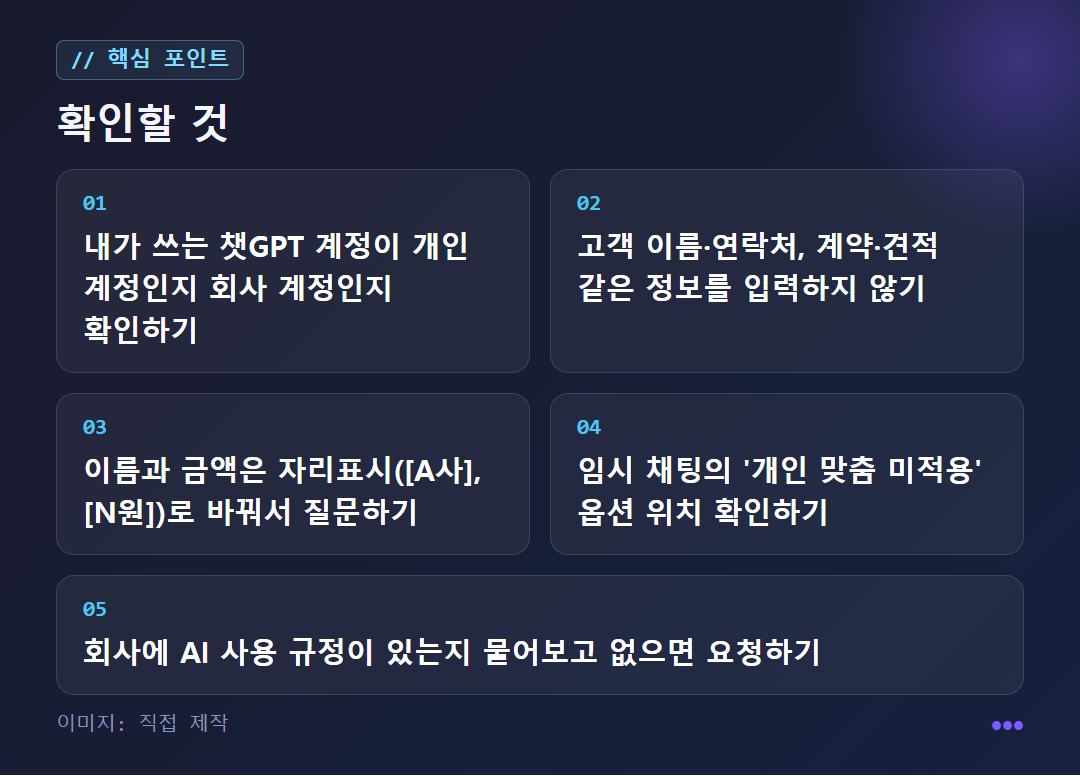
According to the LG U+ article, Free and Go, Plus, Pro (paid) are plans that individuals use on their own. Daily usage and the available AI models differ by plan, but the company can't see who uses it or how, and it is also hard for the company to block the account of someone who has left.
So if an employee uploaded work files with a personal account, that account belongs to the employee, not the company. Even after they leave, the chat history stays in that account. Team and enterprise plans are meant to fill this gap. Specific pricing and limits aren't in the source material and change often, so check OpenAI's official pricing page yourself before paying.
What information should you not enter, and what if you really need to use it?
What the sources clearly name as off-limits is personal information and confidential data. In work terms, that includes lists with customer names and contact details, contract terms or quotes that aren't public yet, and original internal documents. Where confidentiality ends differs by company, so your internal security policy comes first. If in doubt, ask yourself this: would it be okay if this content were passed as-is to a stranger outside the company? If not, it's safer not to enter it.
If you still need to use it, remove the sensitive information from your question. If you replace names, amounts, and client names with placeholders, you can still get help with the structure and wording.
Example: 'Write a draft email to a client about a delivery delay. Use [Company A] for the company name and [N days] for the delay, in a polite tone.'
If you choose 'No personalization' in a temporary chat, saved memory and custom instructions are not used. You can't change this choice after the conversation starts. However, it is only a setting that stops memory from being loaded, not a sign that it's okay to enter confidential information.
Is paying all it takes to adopt it at work? Which approach is right?
No. A one-page rule comes before the pricing plan.
An article by Gongyeosadeul, which helps companies adopt Notion, points out that even if you pay for ChatGPT, AI has nothing to read if company information is scattered in the boss's head or in messengers. It's from a company that recommends Notion, so that part should be read with some skepticism, but its point that some things need deciding before payment matches the LG U+ article. That one says to first set standards for what may be entered into AI and how results will be used.
Choosing is simple. If you work alone and do writing or idea organizing with no customer information, a personal account with questions stripped of sensitive details doesn't carry much risk. If several people use it together or you handle customer or transaction information, consider a team or enterprise plan first.
There are downsides too. Even after switching to a team or enterprise plan, the habit of employees entering confidential information doesn't disappear on its own, and the price may be higher than a personal plan. The amounts aren't in the sources so they're not listed here; check the official page.
✦ See this star on the 3D map