Claude Code vs Codex CLI: Differences, Pricing, and Which to Use
Both start at $20/month. How they work, more than the price, decides the winner.
Scorecard by category
Winner by route
Frequently asked questions

A closer look
So who should use Claude Code, and who should use Codex CLI?
If you want to watch over the work, choose Claude Code; if you want to hand it off and do something else, choose Codex CLI. Claude Code reads and edits files from the terminal on your own computer, and by default it is a supervised style that asks for approval before writing or running commands. It suits people who want to check a large, multi-file codebase step by step.
Codex CLI also runs in a local terminal, but its strength is handing tasks off to the cloud asynchronously. You write out the spec in detail and receive the result, so it is good for doing other things while you wait. It is also rated as a natural fit for terminal-centered work such as scripts and CLI tools.
Your account also matters. If you use ChatGPT, Codex carries on with no extra payment; if you use Claude, Claude Code does.
How are the two stars built differently?
Claude Code is a Claude-only terminal agent made by Anthropic, and it also has IDE extensions. It is known for fine-grained control through subagents (helper AIs that take on split-up tasks), custom commands, and hooks (rules that run automatically at specific points).
OpenAI Codex is a coding agent that runs across the CLI, IDE extensions, the web, and the cloud. The CLI is open source (Apache-2.0) and is reportedly written mostly in Rust. A sandbox (an isolated execution space) is the default, and it has a /review command.
They also have a lot in common. They pass project context through rules files such as CLAUDE.md and AGENTS.md and through MCP (a standard for connecting external tools to AI), and they can be hooked into automation with headless modes such as claude -p and codex exec (running with a single command, no screen). A detailed comparison is in Using Claude's comparison article.
Where does pricing start? How are limits applied?
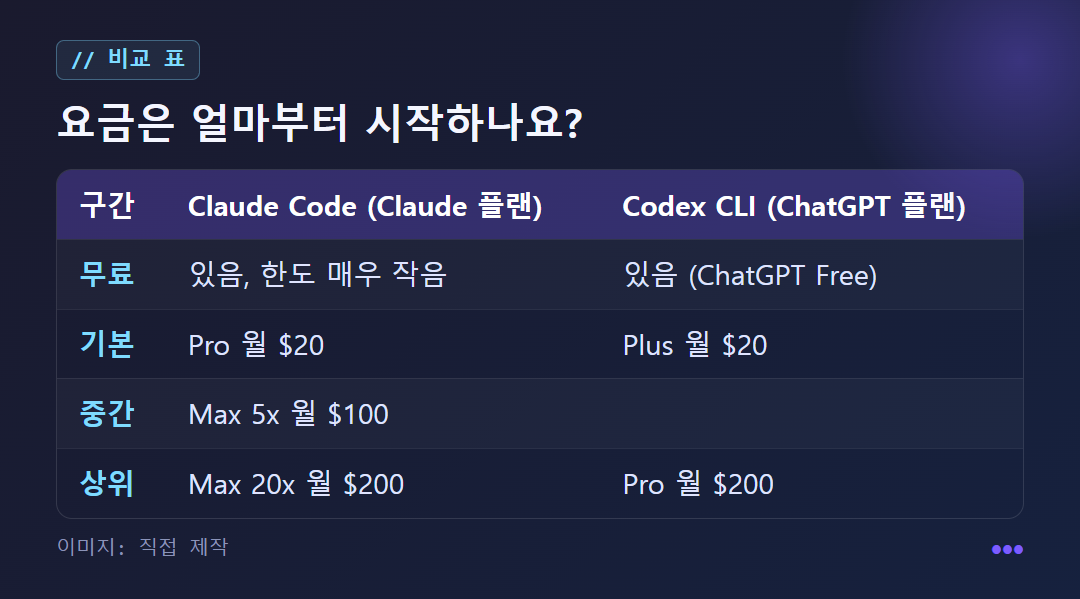
For personal subscriptions, both start at $20/month. Claude is Pro at $20/month, the middle tier Max 5x at $100/month, and the top tier Max 20x at $200/month. ChatGPT is Plus at $20/month and the top tier Pro at $200/month, with no middle tier in the table. Both also have a free tier, but Claude's is noted as having a very small limit. This is copied from the table on the source site (claudecode.to) on 2026-11-05, so check the official pricing page before you pay. Both can also be used with pay-as-you-go API pricing.
The limit structures differ. Besides the 5-hour limit, Claude has a separate weekly cap, so once you hit the weekly cap you cannot use it even after the 5-hour limit resets. Max also has an Opus-only weekly cap, and when you reach it you are moved down to Sonnet.
Codex is included in the Free, Go, Plus, Pro, Business, and Enterprise plans, and the CLI, web, and IDE share the same limit. The latest model has to be looked at separately. Per the November 1, 2026 update notice, Claude Fable 5.1 is included up to 50% of the weekly limit on Max, Ultra, and Team Premium, while Pro and Team Standard use it through usage credits ($10 per 1 million input tokens, $50 for output).
How do safeguards, Korean-language resources, and models differ?
The safeguards point in opposite directions. Codex sets a strong boundary with OS kernel-level sandboxing (macOS Seatbelt, Linux bwrap+seccomp), but its fine-grained control is coarse. Claude Code uses app-level hooks, so the boundary is weaker but you can set rules in great detail. The source's judgment is that a kernel sandbox is better for external code of unknown origin, and hooks are better for enforcing an organization's coding rules. The answer depends on the risk you want to block.
For Korean-language resources, Claude Code is more convenient. Its official docs are multilingual, including Korean, while Codex CLI centers on an English GitHub repository. Some point out that this difference matters quite a bit when learning or checking changes.
Codex's models change often. According to one guide, OpenAI's current docs recommend GPT-6.1 Sol for complex coding (the default since CLI v0.159.1), and GPT-5.5 support for users logged in with ChatGPT ended on October 14, 2026. The models you can use depend on your plan and client. Benchmark scores for even the same GPT-5.5 reportedly differ widely between the official harness (the framework that wraps and runs a model) and a custom scaffold, so a good part of the result may come from the design of the execution environment. The report that Codex used about 1/4 as many tokens as Claude on the same task is also just one case.
How do they differ when given the same job, and what happens if you use both together?
The following is not the result of an actual run, but a usage example based on the official feature descriptions. The task is "Implement issue #42, write tests, and create a PR." With Claude Code, you type something like claude "Implement issue #42, write tests, and create a PR" in the project folder. It is a supervised style that asks for approval before making changes, so you watch the screen and grant permission at each step. With Codex, you hand a more detailed spec off as a cloud task. An isolated sandbox clones the repository, makes the changes, runs the tests, and then shows you the changes (or a PR), while you work on something else in the meantime.
Here is a prompt you can copy and use: "Following the installation steps in the README, find the tests that fail, explain the cause, and tell me your fix plan before changing anything." Starting this way with either tool can reduce unintended large-scale changes.
The sources say there is no universal winner and that using both is common. For example, you might use Claude Code day to day and hand only the hard tasks to Codex CLI. A plugin distributed by OpenAI (codex-plugin-cc) lets you call /codex:review and /codex:rescue from inside Claude Code, and because AIs from the same family reviewing each other tend to inherit the same blind spots, some people split development and review between different tools. Conversely, Codex has a feature that imports your Claude Code settings and recent chats with /import, so the burden of switching is small. Examples can be found on the AWS tech blog.
When not to use them: What are the practical limits?
Both tools send your code to an external service for processing. For repositories containing company confidential information or personal data, check your company policy and the data handling terms of the relevant plan before using them.
Usage limits are also a factor. Claude Code has two layers, a 5-hour limit and a weekly cap, so if you use it heavily in a single day, you may get blocked for the rest of that week. Codex also shares its limit across web, CLI, and IDE, so heavy use on the web reduces the room you have left in the CLI.
There are clear downsides too. Claude Code is Claude-only, so mixing in models from other vendors requires a separate tool, and Codex has little official material in Korean. Beginners unfamiliar with the terminal may get stuck on initial installation and permission settings with both tools, and there is guidance that Windows may require a WSL2 environment. The cheapest and fastest way to compare is to start with one small repository and give the same issue to both tools.
✦ See this star on the 3D map