How to Install Stable Diffusion: From Checking Your PC Specs to the First Run
Start by checking your VRAM. 12GB is plenty, 8GB is enough to get started, and if your graphics card is weak, go with a web service first.
How the orbits differ
- Try it right in your browser
- Google Colab runs notebook cells
- The free allowance differs by site
- Start with the SDXL family
- Quantized Flux is possible
- If you get an out-of-memory error, switch to a lighter model
- SD 3.5 is fine
- Flux is fine
- Good for switching models and comparing them
When to pick ComfyUI, and when to pick Forge
First-run route for Forge one-click
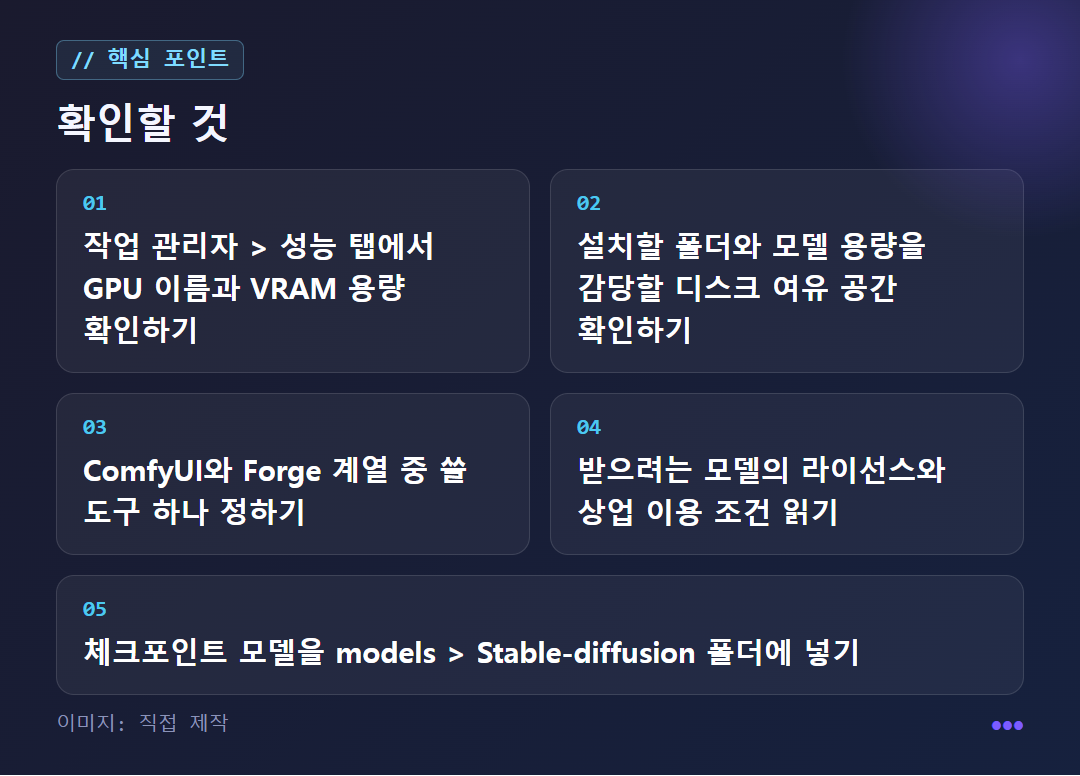
Check your free disk space first
If Windows blocks it, click 'More info' → 'Run anyway'
Then run run.bat
It's downloading its own Python and models. About 5 minutes in the guide I referred to
a cozy cafe window on a rainy day, watercolor style
Frequently asked questions


A bit more detail
Is my computer powerful enough to run it?
What matters is the VRAM of your graphics card (GPU), not the CPU. The installation guide we referenced says 12GB is comfortable for SD 3.5 and even Flux, while with 8GB you can start with SDXL or a quantized Flux (a method that shrinks the model so it runs on less memory).
Consider the type of graphics card too. One beginner's guide explains that NVIDIA graphics cards have good compatibility with Stable Diffusion. You can check your specs in Task Manager: on the Performance tab, look at the GPU name and the dedicated GPU memory.
One thing can be confusing. Some older articles say that installing it yourself is too much for an ordinary personal PC. Now that installation has become lighter, that advice is hard to follow as written, so go by the hardware requirements in recently dated articles.
WebUI, ComfyUI, or Forge Neo: which should you install?
If you are starting fresh in 2026, ComfyUI or Forge Neo is the better choice, according to the reference material. Automatic1111 WebUI, which used to be the most common, has effectively stopped being developed since mid-2024. Introductory articles still explain things based on A1111 because many of them are old.
ComfyUI uses a node-based interface (you connect function boxes with lines) and supports an official one-click desktop installation. Forge Neo is a maintained fork (a version split off from the original and developed on its own), and it suits people who are used to the classic WebUI screen where you type text and click. With the one-click install, the Python environment is set up automatically, so you reportedly never run into version conflicts at all.
If the node interface feels daunting, we recommend the Forge family; if you want to match the latest workflow from the start, we recommend ComfyUI. A detailed comparison is in junetapa's installation guide.
In what order do you install Forge one-click, and how do you make your first image?
Extract the archive, run update.bat first, and when it finishes, run run.bat. You don't need a terminal or Git. This follows the WebUI Forge one-click installation article. If Windows blocks it to protect your PC, click "More info" and then "Run anyway." When update.bat finishes and shows "Press any key to continue," close the terminal and run run.bat.
The first launch takes a long time. It installs a dedicated Python 3.10.6 in a virtual environment and downloads libraries and models, and the models alone are several GB or more. In that article it came up after about 5 minutes, but this varies with your internet speed and PC setup. After that, running run.bat opens it within a few seconds, and you use update.bat only when updating. Note that these instructions are for the original Forge, so for Forge Neo, read the guide that comes with the release you downloaded first.
Once the screen opens, write a prompt (a sentence describing the image) and click Generate. Stable Diffusion works best with English prompts by default, so writing in Korean can distort the meaning. Write in English, even if you have to use a translator. To start, try something like a cozy cafe window on a rainy day, watercolor style.
It's hard to get an image you like in one try. Many people work by generating several images from similar prompts and picking a good one. If that repetition gets tiresome, there is the wildcard feature (it randomly picks words from a list you've written) in the Dynamic Prompts extension. However, since the introductory article is based on the A1111 extension, you'll need to look up separately whether it works the same way in Forge or ComfyUI.
Where do you download model files, and where do you put them?
Installing alone won't produce images. You need to download a model separately. The image style changes greatly depending on the model. Civitai and Hugging Face are the places most often mentioned for downloads. New models keep appearing for different purposes, such as photorealistic, Western-style, and anime-style.
In Forge, move the checkpoint model you downloaded into the models folder inside the webui folder, and then into the Stable-diffusion folder inside it. For extensions, search "available" in the Extensions tab to install them, or enter an address with Install from URL. It's reportedly better to start with only checkpoint models, swap between several, and pick the one you like. ControlNet models play a supporting role, so it's not too late to add them later.
Be sure to check the license too. The terms differ for the program, the models, and the outputs. According to the reference material, SDXL is relatively permissive, SD 3.5 has a community license based on annual revenue of $1 million, and Flux.1 dev requires a separate license for commercial use. If you plan to use the outputs on a blog or in an online store, read the terms of use on the model page first.
If your graphics card is weak, is there a way to use it without installing? And when should you put off installing?
Yes: Google Colab or web services. Google Colab is a service that runs Python code on Google's cloud, so if you run the cells of a Stable Diffusion notebook file in order, you can use it without a high-end PC. No installation is needed, but since you run code, it isn't entirely free of coding. The flow is to save model files in a designated folder in Google Drive, and when you use it again, open the copied notebook in the Colab Notebooks folder and run the same items.
Web services are even simpler. Some Hugging Face Spaces host a Stable Diffusion web UI, and there are also sites like Stable Diffusion Online that let you try it for free in a browser. However, the free limits and terms of use of outside services differ from site to site, so read them yourself before using one.
On the other hand, in some cases it's better to put off a local installation: when you lack VRAM, when you don't have time to review model licenses, or when you don't have disk space for large files. A single model is several GB and more is downloaded on first launch, so starting without enough space will make it stop partway. Also be careful about uploading photos that contain personal information to outside web services or Colab. How those services handle personal information isn't covered by our sources, so we can't say they are safe. For images you don't want to send out, a local setup that processes them inside your own PC is the right choice. This article is a comparison of public guides, not a firsthand installation report, so read it together with the latest instructions that come with the release you downloaded.
✦ See this star on the 3D map