How to Install Ollama: Run Free AI on Windows
The orbit on your own PC is free. Cloud model orbits start at $20/month.
How the orbits differ
- Run models on your own hardware
- Cloud model access (usage limits)
- Unlimited open models
- Larger cloud models
- 3 at a time
- 50x the cloud usage of Free
- 10 at a time
- 5x the usage of Pro
- No data retention
- Shared billing and management
- Priority support
When to use your PC's orbit, and when to use the cloud orbit
The 10-minute Windows installation route
winget install --id Ollama.Ollama
ollama --version
ollama run llama3:8b
Summarize the next meeting notes in 5 lines.
Look for :cloud at the end of the model name
Frequently asked questions
A little more detail
What is Ollama, and is it really free?
The short answer: the part that runs on your own computer is free. Ollama is a tool that makes it easy to run open-source LLMs (language models that act as the brain of a conversational AI) on your own PC. The official site says you can run models locally or in the cloud on macOS, Windows, and Linux. You can get it from the official Ollama site.
The confusing part comes next. Many older articles say "only local is free," but now the free plan can also access cloud models. There is a usage limit, though. If you use the cloud side a lot, you will need a paid plan. So all you need to do is separate what is free from where the costs start. The pricing in this article is what was checked on 2026-10-24.
How do I know whether it will run on my computer?
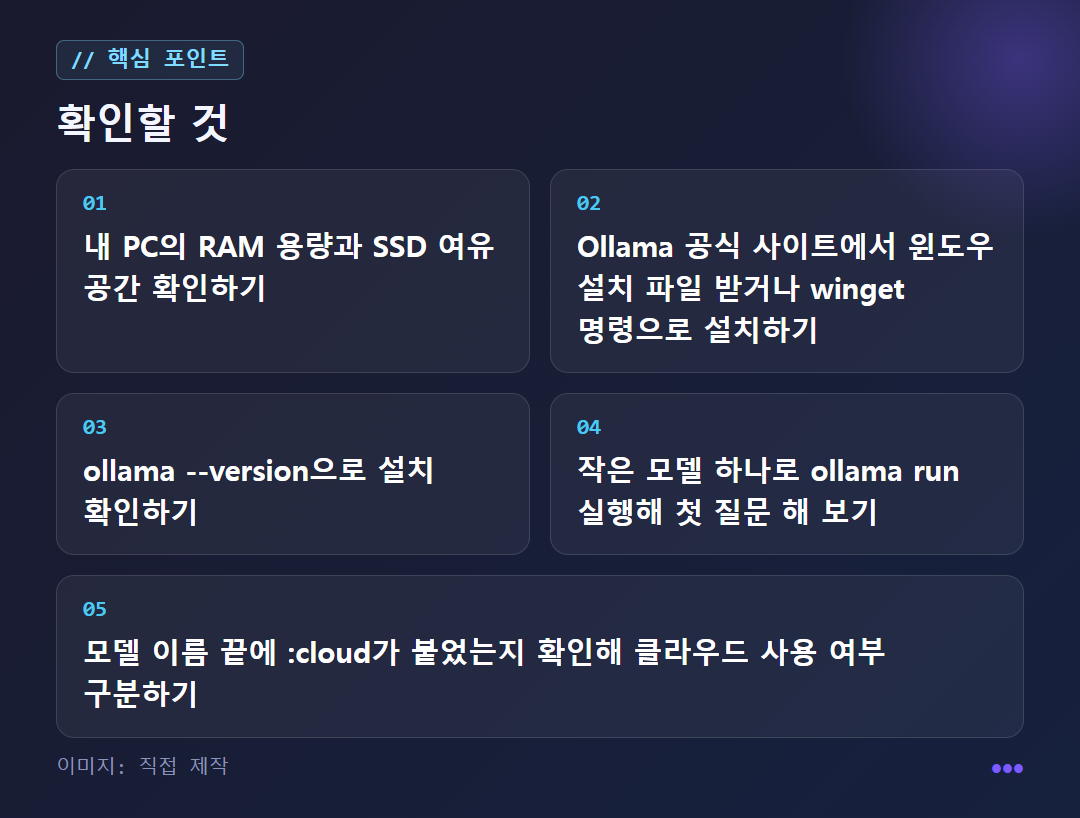
The yardsticks are memory (RAM) and storage space. For 7–13B parameter models (parameters are the unit that expresses model size), 16–32GB of RAM is suitable, and you also need tens of GB of free SSD space for the model and cache. One explanation says that small 3B–8B models run at a practical speed even on a mini PC. For a detailed explanation of the specs, see the CORSAIR guide.
You don't need a graphics card (GPU). Small models run on a PC with only a CPU; the answers are just slower. One thing to watch out for is running a 5GB model on a computer with 8GB of RAM. It overlaps with the share Windows uses and leaves almost no headroom, so if you use other programs at the same time, 16GB or more is safer. This is also a warning from the PicoPulse article.
How do I install it on Windows and run my first model?
Get the installer from the Ollama Windows download page. If you prefer the terminal, you can also enter winget install --id Ollama.Ollama in PowerShell. After installing, type ollama --version, and if a version number appears, you are ready. There are also desktop apps for Windows and macOS, so you can find and download models inside the app.
Next, if you add a model name after ollama run, it downloads the model once and then goes straight to the question screen. For example, something like ollama run llama3:8b. A model you have downloaded once works without the internet.
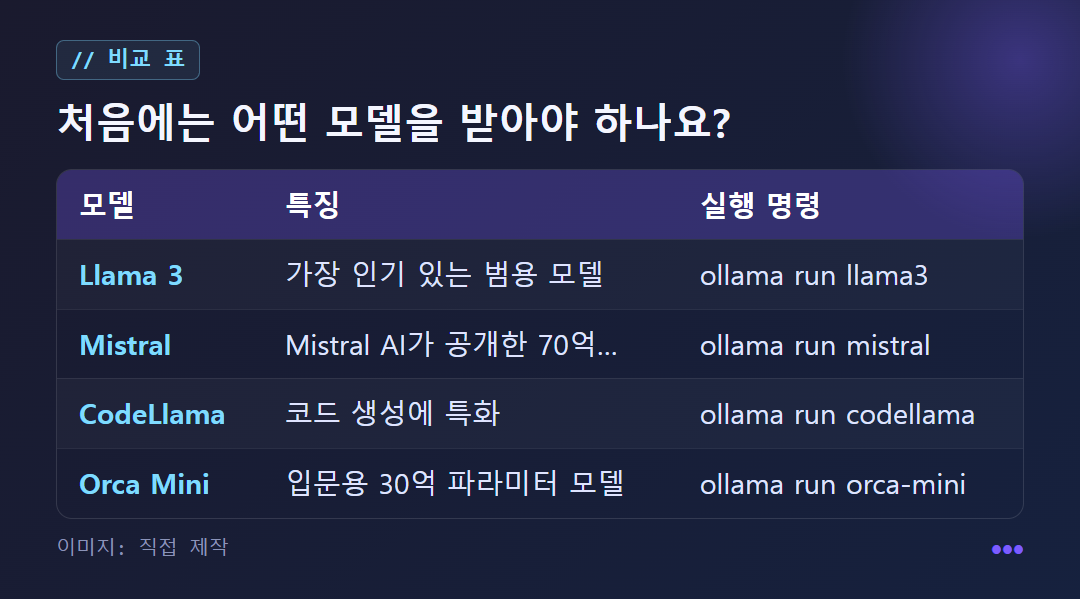
Start with a small model. The representative models introduced by one installation guide are Llama 3 (the most popular general-purpose model), Mistral (7 billion parameters), CodeLlama (specialized for code generation), and Orca Mini (3 billion parameters, for beginners). You can choose like this: a general-purpose model for writing and summaries, CodeLlama for coding help. Large models over 20 billion parameters use more RAM and VRAM (graphics card memory), and the wait gets longer too. The model list keeps changing, so check the name in the official model library before downloading. The guide I referred to is on Coding Fast Lane.
Where do cloud models and paid plans come in?
The dividing line is :cloud at the end of the model name. ollama run gemma4 runs on your own computer, and ollama run gemma4:cloud runs in the cloud. The commands look the same, so it's easy to use the cloud by mistake. Be sure to check the end of the name once.
The pricing is taken from Billion Napkin's summary based on official documentation, and the check date is 2026-10-24. Free is $0, with running on your own hardware, cloud model access (with usage limits), and unlimited public models. Pro is $20/month, with larger cloud models, 3 concurrent, and 50x the cloud usage of Free. Max is $100/month, with 10 concurrent and 5x the usage of Pro. Team is $25/month per seat (minimum 5 seats), with no data retention, shared billing and management, and priority support.
The rule of thumb is simple. If the model fits on your hardware, local is better. Your data doesn't leave your machine, and there are no usage limits or costs. Only consider the cloud when a model exceeds your memory or you need to run several at once. Before paying, check the numbers on the official pricing page again.
What should I ask a local AI to do, and when is it not a good fit?
Tasks with a defined scope are a good fit. Summaries, translation, drafting, and simple coding help are typical examples. Even material you'd hesitate to send out, such as company documents, is processed locally without being sent to outside servers. To start, try pasting something like this. Summarize the next meeting notes in 5 lines, and pull out the decisions made and the people in charge separately. For an English email, you can ask Translate it into natural Korean, and separately tell me the questions I need to reply to.
On the other hand, it's hard to expect the knowledge and depth of reasoning of the latest cloud AI from a local model in the 3–8B range. For complex logic problems or questions that need up-to-date information, the cloud has the upper hand. If you set your expectations for narrow tasks such as summaries, translation, and drafts, your satisfaction goes up.
There are also settings that are easy to miss. There is advice that setting the context length (the amount of text the AI remembers at once) large, at 32k–64k tokens, makes answers noticeably slower, so you should start at 4k–8k and increase it only when needed. Also, conversations in local tools are saved on your own computer by default, but integrations that connect to external services may behave differently, so open the settings and check. This article is not a hands-on review; it is a summary of publicly available guide documents.
✦ See this star on the 3D map